What happened?
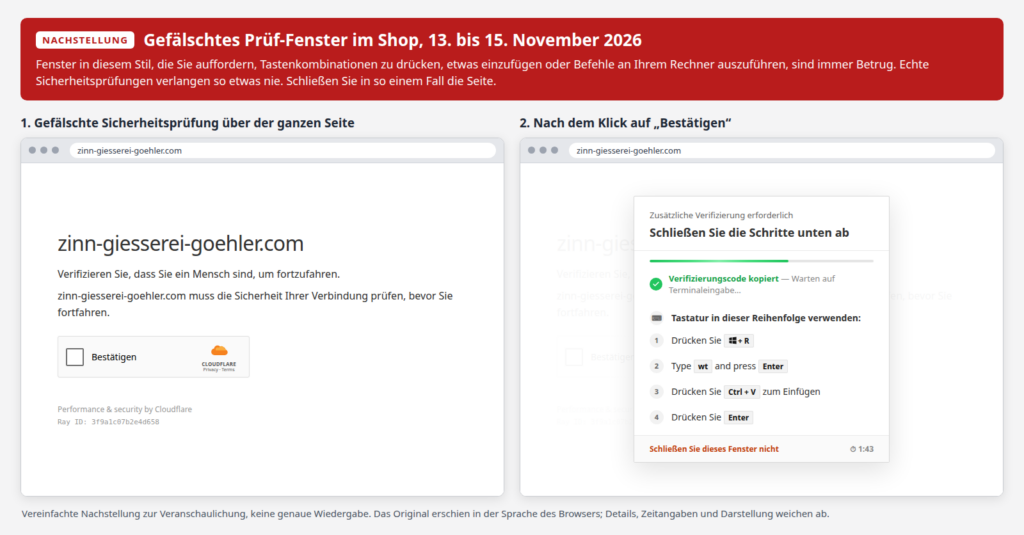
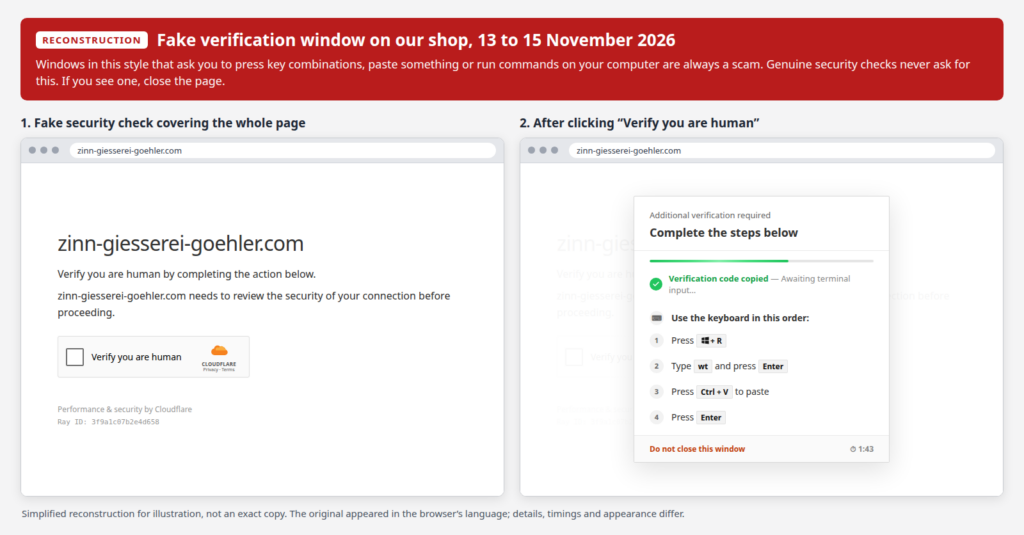
Between Friday, November 13, 2026, at 10:20 AM, and Sunday, November 15, 2026, at 11:23 AM, an unauthorized third-party script was served in our shop without our knowledge. It presented visitors using Windows PCs with a fraudulent window titled “Zusätzliche Verifizierung erforderlich” (English: “Additional verification required”).
This window did not originate from us. We suspended the shop on November 15, removed the script, and conducted a full audit of the store. It has been safely accessible again since November 16.
As a general rule: Pop-ups or windows instructing you to press key combinations, paste clipboard contents, or execute commands on your computer are always fraudulent. Legitimate security verifications never require such actions. If you encounter such a request, close the page immediately.
What the prompt required
The window mimicked a Cloudflare security check. After clicking the “Verify” checkbox, it prompted users to execute the following steps:
- Press the keys Windows + R,
- type wt and press Enter,
- paste content using Ctrl + V,
- press Enter once more.
Clicking “Verify” silently copied a command to the clipboard. Users who carried out these steps downloaded and executed malware from the internet onto their system.
You are not affected if you
- visited the shop using a smartphone, tablet, Mac, or Linux device (the window was not displayed on these platforms),
- saw the window but did not carry out the steps, or stopped before completing them. Merely viewing the website did not make any changes to your device.
You are affected if you
- completed the steps through the final Enter key on a Windows PC. If so, take the following steps:
- Disconnect your computer from the internet,
- change your critical passwords from a different device—prioritizing email, online banking, payment providers, and accounts stored in your browser; log out of active sessions across all platforms (“sign out of all devices”), and enable two-factor authentication wherever possible,
- have your computer inspected by an IT professional. A clean reinstallation of Windows offers the highest level of security, as an antivirus scan alone may not reliably remove the threat,
Your Data Stored with Us
- Based on our technical analysis, the script did not intercept or extract any input submitted in the shop, such as passwords, addresses, or payment information.
- Payments are processed via PayPal, credit card processing through our payment service provider, or bank transfer. Card and bank account details are never stored on our servers and were therefore not compromised by this incident.
- You do not need to change your customer account password because of this incident.
We are currently reporting the incident to the relevant data protection authority and are filing a criminal complaint.
Transparency regarding this incident is very important to us. If you have any questions or require assistance, please do not hesitate to contact us.
Please contact us at [email protected] or by phone at +49-351-43843794. We will be glad to assist you with any inquiries.
We deeply regret this incident and sincerely apologize for any inconvenience caused.
Your Zinn-Gießerei Göhler team